
Download Keyboard Spy – free secure Mac keystroke recorder
Overview – What is Keyboard Spy?
Keyboard Spy is a lightweight utility designed specifically for macOS that captures every keystroke entered on a Mac computer. First introduced in 2007, the program has amassed more than 34,000 downloads and continues to serve users in regions such as Malaysia, India, and Germany. Built as a trial version, Keyboard Spy offers a straightforward interface that lets you monitor typing activity without the need for complex configuration.
Whether you are a system administrator looking to audit user activity, a parent wanting to keep an eye on a child's computer usage, or a researcher interested in analyzing typing patterns, Keyboard Spy provides a reliable, low‑footprint solution. The software is categorized under Utilities → Mouse & Keyboard, emphasizing its focus on input‑device monitoring rather than broader system management. Despite its age, the latest update (v2.8) still runs smoothly on modern macOS releases, thanks to its minimal storage requirements and lack of heavy background processes.
The application is multilingual, supporting English, Spanish, and German, making it accessible to a global audience. Because it records keystrokes locally, the program is considered a “secure” option for private monitoring—no data is automatically transmitted to the cloud, and all logs are saved on the host machine. This design choice aligns with privacy‑conscious users who prefer on‑device storage over third‑party services.
Overall, Keyboard Spy blends simplicity with functionality, offering a no‑frills approach to keylogging on macOS.
Key Features of Keyboard Spy
- Real‑time keystroke capture for all active applications.
- Detailed log files with timestamps, application names, and window titles.
- Multi‑language support (English, Spanish, German) for both interface and log output.
- Compact installer – requires less than 2 MB of disk space.
- Configurable logging interval and file rotation to prevent oversized logs.
- Secure local storage – logs are saved on the Mac’s hard drive, no cloud sync.
- Compatibility with macOS X (10.3 and later) and legacy versions.
- Simple start/stop controls via menu bar icon.
- Export options: plain text, CSV, and XML for easy analysis.
- Trial mode with full feature access for a limited period.
While Keyboard Spy’s feature set may appear modest compared with modern commercial keyloggers, its focus on core functionality makes it remarkably stable. The real‑time capture engine runs as a background daemon, ensuring that no keystroke is missed, even when the user switches between applications rapidly. The timestamped logs are particularly useful for forensic analysis, as they allow investigators to reconstruct a user’s exact workflow.
Export capabilities mean you can feed the data into spreadsheet software or specialized analysis tools without manual parsing. Because the program does not rely on internet connectivity, it remains functional in air‑gapped environments, which is a critical advantage for secure facilities. The trial version removes the usual “feature‑lock” barrier; you receive full access to every option, enabling a genuine evaluation before deciding whether to purchase the full license.
In short, Keyboard Spy’s feature list is deliberately curated to provide exactly what a keystroke‑recording utility needs—reliability, privacy, and ease of use—without unnecessary bloat.
Installation, First‑Run Setup & Compatibility
Step‑by‑step installation
Installing Keyboard Spy on a Mac is a straightforward process that can be completed in under five minutes. First, download the DMG file from the official website or a trusted software repository. Once the download finishes, double‑click the DMG to mount the disk image.
Drag the Keyboard Spy icon into the Applications folder, just as you would with any standard macOS app. After copying, eject the disk image and launch the program from Applications. The first launch will prompt you to grant the application “Input Monitoring” permission in System Settings → Security & Privacy → Privacy.
This permission is mandatory for the software to intercept keystrokes at the system level. After granting access, restart Keyboard Spy to activate the daemon. The trial period begins automatically, and you’ll see a menu‑bar icon indicating that logging is active.
Operating system support
Keyboard Spy officially supports macOS X (10.3) and all subsequent releases, including macOS Ventura (13) and macOS Sonoma (14). Because the program is built on legacy Cocoa frameworks, it runs efficiently on older hardware without demanding modern GPU acceleration. Users of macOS versions prior to 10.3 may encounter compatibility issues, as the underlying system APIs required for input monitoring were introduced with that release. The software’s low‑memory footprint (under 30 MB RAM) ensures that even older Macs with limited resources can operate the keylogger without noticeable slowdowns. For best performance, we recommend running Keyboard Spy on a system with at least 2 GB of RAM and a modern Intel or Apple Silicon processor; however, the program is not yet natively compiled for Apple Silicon, so it runs under Rosetta 2 on M1/M2 machines.
First‑run configuration
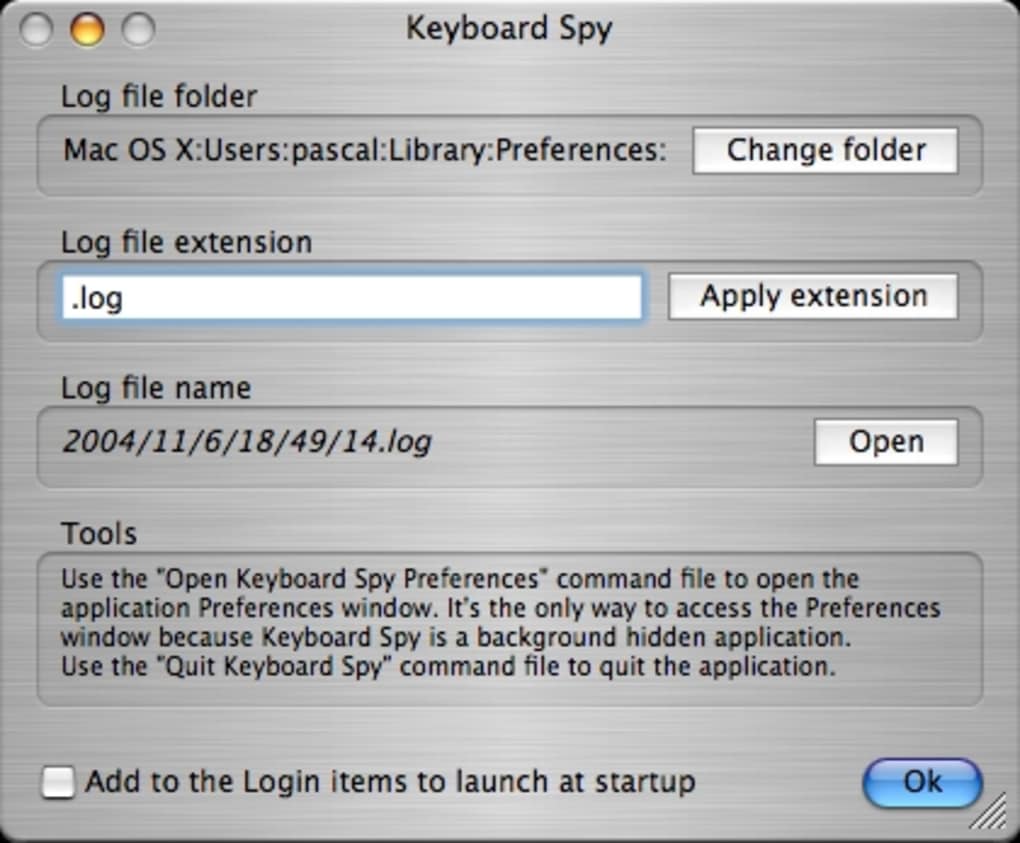
Upon the initial launch, a configuration window appears where you can define the log file location, set a maximum file size (default 5 MB), and choose the preferred export format. The “Auto‑rotate” option is useful for long monitoring sessions, as it automatically creates a new log file once the size limit is reached. Advanced users can enable “Hide Log Window” to run Keyboard Spy completely in the background, leaving only the discreet menu‑bar icon visible. If you need to pause logging temporarily—perhaps during a presentation—simply click the icon and select “Pause.” All settings are saved in a hidden preferences file within the user’s Library folder, ensuring they persist across reboots.
Pros, Cons, Frequently Asked Questions & Final Verdict
Pros
- Extremely lightweight – minimal impact on system performance.
- Secure local storage; no data is sent to external servers.
- Full‑feature trial version allows genuine testing before purchase.
- Multi‑language interface and log output.
- Simple menu‑bar control makes starting and stopping logging effortless.
Cons
- No native Apple Silicon (M1/M2) build – runs under Rosetta 2.
- Interface looks dated compared with modern macOS design guidelines.
- Lacks advanced analytics or built‑in reporting dashboards.
- Trial period is time‑limited; after expiration you must purchase a license.
- Only supports macOS – no Windows, Android, or iOS versions.
Frequently Asked Questions
Is Keyboard Spy legal to use?
The legality of a keylogger depends on how it is used. Keyboard Spy is legal for legitimate monitoring purposes, such as parental control, employee auditing with consent, or personal backup of your own typing. Using it without the knowledge or permission of the person being monitored may violate privacy laws in many jurisdictions.
Can Keyboard Spy record passwords securely?
Yes, Keyboard Spy captures every keystroke, including passwords, and stores them locally in the log file. Because the logs are saved on the Mac’s hard drive and are not transmitted online, they remain as secure as the host system’s overall security. However, it is recommended to encrypt the log files if you store sensitive credentials.
How do I uninstall Keyboard Spy?
To uninstall, quit Keyboard Spy from the menu bar, drag the application from the Applications folder to the Trash, and then remove the preferences file located at ~/Library/Preferences/com.keyboardspy.plist. Empty the Trash to complete the removal.
Does the trial version have any hidden limitations?
No. The trial version provides full access to all features for a limited time (usually 14 days). After the trial expires, the software will stop logging until a license key is entered.
Can I export logs to other devices?
Yes. Keyboard Spy supports exporting logs as plain text, CSV, or XML. You can copy the exported files to external drives, email them, or import them into analysis tools on other computers.
Keyboard Spy delivers what it promises: a reliable, low‑impact keylogging utility for macOS. Its strengths lie in privacy‑first design and a generous trial period, while the lack of a native Apple Silicon build and dated UI keep it from earning a perfect score. For users who need a simple, secure way to monitor keystrokes on a Mac, Keyboard Spy remains a solid choice.
Conclusion – Should You Download Keyboard Spy?
If you are looking for a no‑frills, secure way to capture every keystroke on a Mac, Keyboard Spy still holds up after more than a decade of development. Its lightweight footprint, local‑only storage, and full‑feature trial make it especially appealing for privacy‑conscious users, educators, and system administrators. While the interface may feel a bit retro and there is no native Apple Silicon version yet, the core functionality remains robust and dependable.
The pros outweigh the cons for most legitimate monitoring scenarios, and the ability to export logs in multiple formats adds flexibility for post‑capture analysis. Ready to give it a try? Click the download button below, install the DMG, grant input‑monitoring permission, and start recording keystrokes securely today.
Download Keyboard Spy Free Trial






